Introducing SketchPath: Browser-Native CNC Design, Finally Done Right

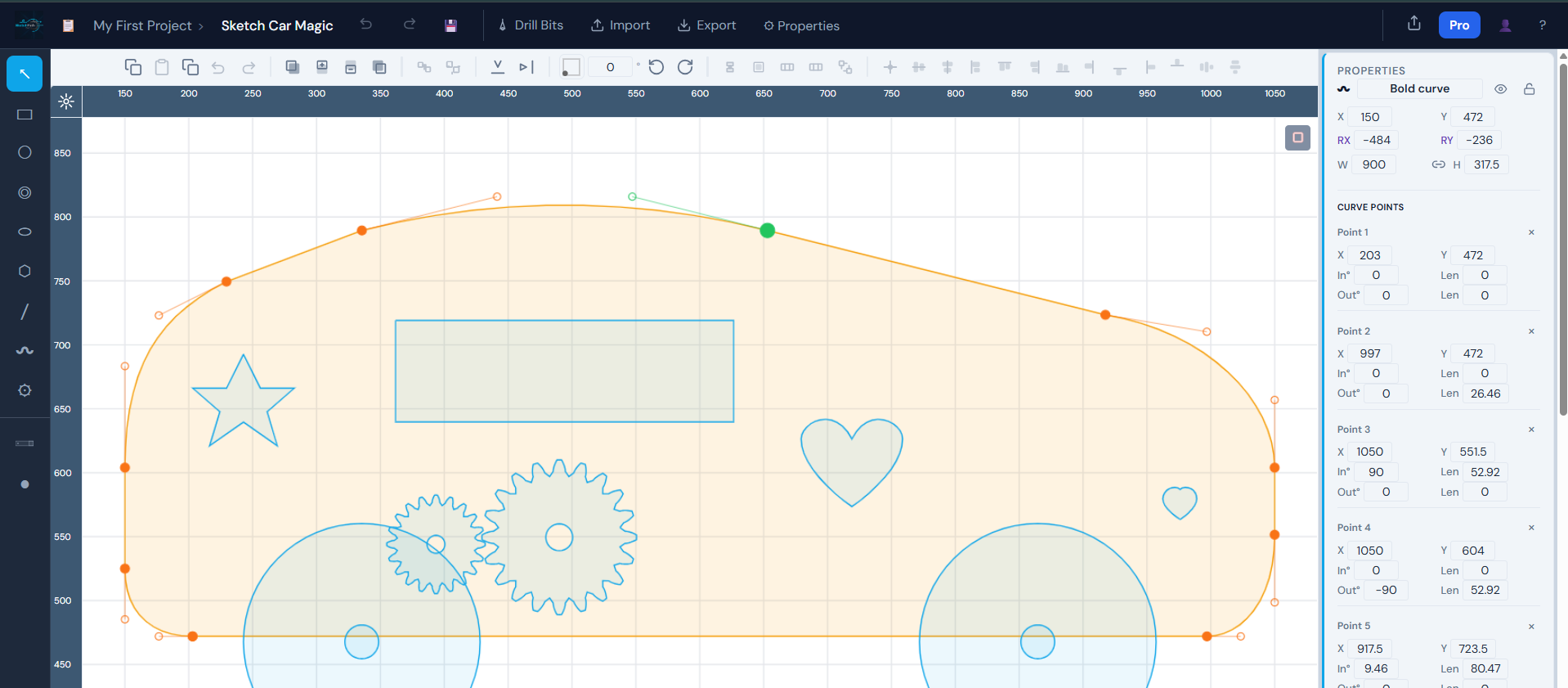
For years, CNC design has been locked behind expensive, heavyweight desktop software. You'd spend hundreds of dollars on a license, hours on installation and configuration, and even more hours learning an interface built for aerospace engineers — just to cut a wooden coaster.
SketchPath changes that. Today, we're officially launching SketchPath — a full-featured, browser-based 2D CAD/CAM tool built specifically for CNC routers and laser cutters. No installation. No license fees tied to a single machine. Just open a tab and start designing.
The problem with desktop CNC software
Desktop CAD/CAM tools were designed in a different era. They assume you have one machine, one computer, and a dedicated workspace. They export ancient file formats, bundle years of legacy features you'll never touch, and charge accordingly.
The result? A massive barrier between you and your machine.
Hobbyists give up before they ever cut their first part. Small shops pay for seats that sit unused. Anyone switching from a router to a laser cutter has to learn an entirely different tool.
The browser erases all of that.
SketchPath runs where you already are
SketchPath lives entirely in your browser. Open app.sketchpath.io, sign in, and you're drawing. Your projects are saved to the cloud and available from any device — your workshop laptop, your home desktop, your tablet. No sync folders, no version conflicts, no "which machine has the latest file."
When you upgrade to a new computer, SketchPath doesn't require reinstallation. When a browser update ships a new rendering improvement, SketchPath gets it automatically. Updates happen in the background, silently, the way software should work in 2026.
A toolbox built for makers, not aerospace engineers
SketchPath ships with exactly the tools you need to design real parts:
- Rectangle, Circle, Ellipse, Polygon — fundamental shapes with precise dimension inputs
- Path and Curve — freeform vector drawing for organic shapes
- Text — rendered as clean vector paths, ready to engrave or cut
- Gearbox (Hobby plan) — parametric gear generation, because mechanical makers need gears
- Fixtures — place simple clamps and bolts directly on your drawing to visualize workholding
Everything is designed to feel immediate. Select, draw, adjust. No modal-heavy dialogs for every single operation.
Start from a sample, not a blank canvas
One of the fastest ways to get started is the Sample Project Catalog — a curated library of ready-to-cut designs organized by category. Kitchen projects (cutting boards, charcuterie boards, coasters, spice racks, wine racks, bottle openers), gifts, storage, and more. Browse by name, category, or tag — beginner, intermediate, engraving, gift. Import a sample into your drawing, adjust dimensions, and you're ready to cut.
There's also a Shape Catalog with thousands of icons and decorative elements you can drop directly into any project.
SVG import that actually works
If you've already designed something in Inkscape, Adobe Illustrator, or any other vector tool, SketchPath can import it. The SVG importer handles rectangles, circles, ellipses, lines, polylines, polygons, and complex paths — including nested groups, transforms (matrix, translate, scale, rotate, skew), and real-world units (mm, cm, inches, points, pixels).
Bring your existing work in. SketchPath reads it correctly and converts it into editable, toolpath-ready geometry.
From drawing to G-code in the same tool
This is where SketchPath closes the loop. Most CAD tools make you export a DXF, import it into a separate CAM tool, configure your toolpaths there, and then export G-code. That's three tools and three file conversions for one simple job.
In SketchPath, the CAM step lives next to the drawing step. Assign feeds, depths, tabs, and lead-ins. Configure your material and zero point. Preview the G-code before you send it. Export it when you're ready.
SketchPath supports both CNC routers and laser cutters — switch machine types and the interface adapts. CNC mode surfaces the drill bit library. Laser mode focuses on what matters for laser workflows.
Pricing built for everyone
SketchPath is free to start, draw and export. Sign in with Google, explore the tools, open sample projects, and design freely.
The Hobby plan unlocks advanced features like the Gearbox tool, sample project imports, and plan-gated CAM options. It's priced for the individual maker — not for a corporate CAD seat.
No perpetual license. No dongle. No "this version of the software is no longer supported, please upgrade." Just a subscription that keeps the lights on and the features shipping.
Why web-based wins long-term
The argument for desktop software used to be power and performance. Modern browsers have closed that gap. WebGL, WebAssembly, and the raw speed of modern JavaScript runtimes mean that browser apps can match desktop performance for vector drawing and toolpath generation.
What the browser adds that desktop can't match:
- Zero installation — share a link, not a setup wizard
- Cross-device access — your drawings go where you go
- Instant updates — no patch downloads, no restart required
- Collaboration-ready — sharing a design is as simple as sending a URL
- Lower cost — no OS-specific builds, no hardware dongles, no per-seat licensing overhead passed on to you
Desktop CNC software made sense when browsers were toy environments. That era is over.
Try it today
SketchPath is live now. Head to app.sketchpath.io, sign in with Google, and start your first project.
Subscribe to this blog for deep-dives on features, workflow tutorials, and what's coming next.
There's a lot more to build — and we're just getting started.
Adriana and Corneliu are the creators of SketchPath.